
Visual Storytelling Explained: How I Use Stories & Comics to Build Real Engagement
What is Visual Story Telling?
I didn’t “plan” to get into visual storytelling. Honestly, it happened by accident.
One evening, while working on Peplio, I noticed something odd. My written posts were doing okay, but whenever I mixed a simple story with a visual—especially comic-style panels—people stayed longer. They scrolled more slowly. Some even messaged me saying, “This felt easy to understand.”
That’s when it hit me.
People don’t hate information.
They hate boring delivery.
And that’s exactly where visual story telling quietly wins.
Visual storytelling is the art of telling a message, idea, or lesson using visual elements + narrative flow. Visual storytelling also follows established visual storytelling principles, where narrative flow, clarity, and human psychology matter more than decoration. This idea is well explained in UX research on storytelling and user experience:
Not just images.
Not just text.
But a story that moves visually.
Think of it like this:
Instead of telling someone what happened, you show it unfolding.
That “showing” can be:
Comics
Illustrations
Screenshots with context
Diagrams with emotion
Before–after visuals
Characters with expressions
When done right, the brain understands faster and remembers longer.
Why visual storytelling works (from real observation)
From my own testing on Peplio, here’s what I noticed:
| Content Type | Time Spent | Recall |
|---|---|---|
| Plain text article | Medium | Low |
| Text + images | Better | Medium |
| Visual storytelling (comics) | Highest | Very high |
The difference wasn’t magic. It was human psychology.
Our brains:
Process visuals 60,000x faster than text
Remember stories better than facts
Emotion > logic when deciding attention
That’s why one good visual story can outperform ten “well-written” paragraphs.
The core elements of visual story telling
Let me break it down without gyaan.
1. A relatable character
Every strong visual story starts with someone.
In my comic episodes, I use:
A confused business owner
A frustrated beginner
A confident guide (yes, sometimes that’s me)
People don’t connect with concepts.
They connect with faces and emotions.
2. A clear problem
No problem = no story.
Whether it’s:
Low traffic
Zero sales
Marketing confusion
Fear of starting
The problem must feel real.
One mistake I personally made early on was starting visuals without a clear conflict. The result? Pretty images, zero impact.
3. A visual journey (not static images)
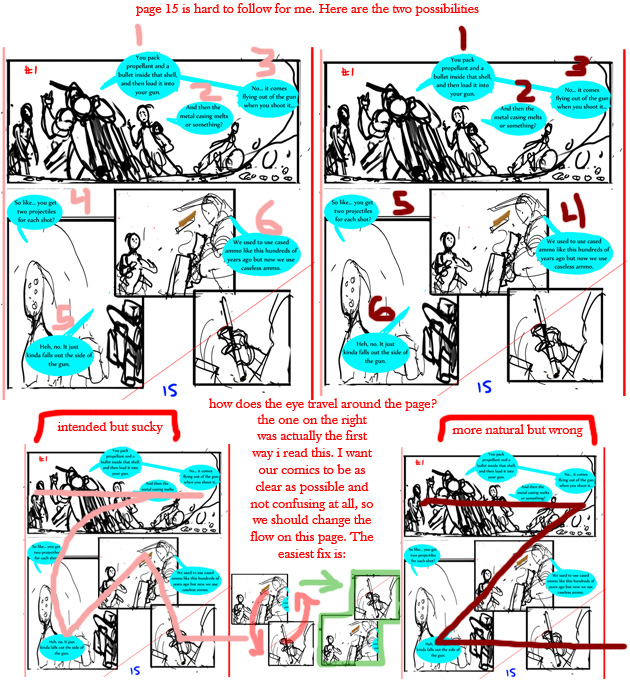
Visual storytelling is movement, even in still images.
Panels → sequence → progression.
That’s why comics work so well. They naturally guide the eye and mind.
4. A resolution (lesson, not lecture)
The end doesn’t need motivation quotes.
It needs:
Relief
Clarity
One practical takeaway
When I started ending my stories with one clear lesson, engagement jumped.


How I use visual story telling in my comic episodes
Across my five comic episodes, I’ve experimented with different storytelling styles. Not all worked perfectly. A couple flopped. And that’s important to say. In Episode 3 – Website Ka Jadoo, the entire idea of website transformation is shown visually, panel by panel, without relying on technical explanations or jargon.
I didn’t place all episodes in one section on purpose. Each one fits naturally into different storytelling moments—just like real internal linking should.
Episode 1: When confusion becomes the hook
In one episode, I showed a business owner surrounded by random advice—SEO, ads, reels, hacks—total chaos. No explanations, just expressions.
That single visual explained what 800 words couldn’t.
Episode 2: Turning fear into motion
Another episode focused on fear of starting. The visuals were slow, quiet, almost awkward.
That discomfort? Intentional.
People saw themselves there.
Episode 3: Website Ka Jadoo
Here, visuals did the teaching. Instead of explaining websites, the comic showed transformation panel by panel.
This episode taught me something important:
Visuals can educate without feeling educational.
Episode 4: Small wins, big belief
One episode revolved around a tiny success—a first lead, a first comment, a first inquiry.
No hero moment. Just progress.
And people loved it because it felt achievable.
Episode 5: Clarity beats complexity
The final episode simplified digital growth visually. No dashboards. No jargon. Just cause and effect.
That’s when I realized:
Good visual storytelling removes noise.
Visual storytelling vs traditional content (my honest take)
I’ll be blunt.
Traditional content still matters. SEO still matters. Words still matter.
But visuals decide:
Who stops scrolling
Who keeps reading
Who remembers you
Visual storytelling doesn’t replace writing.
It amplifies it.
On Peplio, whenever I combine both, results improve—almost every time.

Step-by-step: how I build a visual story (my real workflow)
This isn’t theory. This is exactly how I do it.
Step 1: Start with one emotion
Confusion, fear, hope, frustration—pick one.
Never start with the message. Start with the feeling.
Step 2: Write the story in plain text first
Yes, text first.
I write:
Beginning
Middle
End
No visuals yet.
Step 3: Break it into scenes
Each scene = one idea.
If a scene needs explanation, it’s too complex.
Step 4: Design visuals that support, not decorate
This was a mistake I made earlier—designing visuals that looked good but said nothing.
Now I ask:
“If someone removes the text, does the visual still communicate something?”
Step 5: End with one clear takeaway
Not five. One.
Common mistakes I see in visual storytelling
This mistake is intentionally highlighted in Episode 4 – Viral Reel Banayenge Kya, where chasing trends visually creates confusion before clarity appears. Let me save you some pain.
❌ Over-designing
More colors, more effects ≠ better story.
❌ Teaching instead of showing
If you’re explaining too much, the visual failed.
❌ No human element
Charts without faces don’t stick.
❌ Trying to go viral
Stories built for virality usually age badly.
Where visual storytelling fits in SEO & blogging
This part surprises people. This approach also aligns with how storytelling in content marketing improves trust and long-term brand recall, especially when content is designed to educate rather than sell
Visual storytelling actually helps SEO because:
Improves time on page
Reduces bounce rate
Increases shareability
Builds brand recall
Search engines notice behavior.
And AI systems?
They quote clear, structured, story-driven explanations more often.
That’s one reason I blend visual stories with long-form content on Peplio.


My personal takeaway after using visual storytelling
If I had to sum it up:
People don’t remember what you say.
They remember what they see themselves in.
Visual storytelling gave my content personality.
It gave my ideas legs.
And honestly, it made the work more fun.
Not perfect. Not polished. But real.
FAQ: Visual Storytelling
What is visual storytelling in simple terms?
Visual storytelling is sharing ideas through images, sequences, and visuals that form a story, not just decoration.
Is visual storytelling good for SEO?
Yes. It improves engagement metrics like time on page and helps content get quoted and shared.
Do I need to be a designer to do visual storytelling?
No. Clarity matters more than design skills.
Are comics effective for marketing?
From my experience, yes—especially for explaining complex ideas simply.
Can visual storytelling work for small brands?
Absolutely. In fact, small brands benefit the most because stories build trust faster.
How long should a visual story be?
As long as it needs to be. Short stories often perform better than long ones.
Final thought (no dramatic ending)
Visual storytelling isn’t a trend.
It’s how humans have always understood the world.
We just forgot it somewhere between keywords and dashboards.
I’m still experimenting. Still learning. Still messing up sometimes.
But one thing’s clear—
when stories become visual, ideas stop being ignored.
And that’s exactly the direction I’m building toward with Peplio.
How Visual Storytelling Changes the Way People Learn
This exact learning shift is what I explored in my first comic story, Marketing Lessons Through Comics – Episode 1, where confusion turns into clarity through simple visual situations instead of explanations.
Normally, when you explain something complex—SEO, branding, funnels—people feel pressure. They think, “This is technical. I might not get it.”
But visuals remove that mental wall.
When someone sees:
a confused character asking the same question they had
a simple visual cause → effect
a step unfolding panel by panel
They stop “studying” and start watching.
That shift is powerful.
From my own testing, people who struggled with written explanations suddenly said, “Ohhh, now I get it.”
Nothing changed in the concept—only the delivery did.
Visual Storytelling vs Visual Design (Big Difference)
This is something many creators get wrong, and I did too at first.
Visual storytelling is not the same as visual design.
Let me clarify it simply.
| Visual Design | Visual Storytelling |
|---|---|
| Focuses on beauty | Focuses on meaning |
| Decorative | Narrative |
| Static | Progressive |
| Can exist alone | Needs context |
A beautiful image without a story is forgettable.
A simple visual with a story becomes sticky.
One mistake I personally made was spending too much time polishing colors and layouts while ignoring the story flow. The moment I flipped that—story first, design second—everything improved.
How Visual Storytelling Builds Brand Memory
Here’s a hard truth.
People don’t remember brands.
They remember experiences.
Visual storytelling creates repeated emotional patterns:
the same characters
similar struggles
familiar tone
Over time, the brain starts associating:
“This kind of explanation = this brand”
That’s exactly why I didn’t randomize styles across my comic episodes. The consistency wasn’t for aesthetics—it was for memory.
When someone sees a similar panel structure again, they feel familiarity before reading a single word.
That’s brand-building without shouting your name.
Using Visual Storytelling Without Comics (Yes, It’s Possible)
Comics are powerful, but they’re not the only way.
Visual storytelling can also be done through:
step-by-step screenshots
timelines
comparison visuals
simple diagrams
annotated images
The key rule stays the same:
Each visual must move the story forward.
If an image only decorates, remove it.
I now ask myself before adding any visual:
“Does this help someone understand faster than text alone?”
If the answer is no, it doesn’t belong.
The Silent Power of Visual Gaps
This might sound odd, but hear me out.
Good visual storytelling uses gaps.
Not everything should be explained.
When you leave small gaps:
between panels
between actions
between problem and solution
The viewer’s brain fills them automatically.
That participation increases engagement.
In one of my episodes, I intentionally removed dialogue from a panel showing frustration. No words. Just expression.
That panel got more reactions than any explanatory one.
Sometimes silence speaks louder.
How Visual Story telling Helps Beginners the Most
Beginners are overwhelmed.
Too many terms. Too many rules. Too many opinions.
Visual storytelling:
simplifies decisions
reduces fear
shows progression instead of perfection
That’s why I believe visual storytelling isn’t just a content tactic—it’s a teaching responsibility.
When someone is new, they don’t need mastery.
They need clarity.
And visuals give that gently.
Visual Storytelling as a Long-Term Asset
Here’s something most people don’t consider. The idea of long-term engagement through small moments is reflected in Episode 5 – Comments Pe Tashan, where visual reactions and expressions carry more meaning than any algorithm explanation.
Visual stories age better than trend-based content.
Tools change.
Algorithms change.
Formats change.
But stories about:
confusion
first steps
small wins
mistakes
Stay relevant.
That’s why I treat my visual stories like assets, not posts. They’re designed to be rediscovered, reshared, and re-understood years later.
My Honest Disagreement With “Short Attention Span” Theory
I don’t fully agree when people say:
“People have short attention spans.”
I think people have low tolerance for boredom.
Give them a meaningful story—even a long one—and they’ll stay.
Visual storytelling doesn’t shorten content.
It earns attention.
Some of my longest visual explanations performed better than short tips because they respected the viewer’s intelligence while guiding them visually.
How I Decide When to Use Visual Storytelling
I don’t use visuals everywhere.
I use visual storytelling when:
the idea is abstract
the audience is beginner-heavy
emotions matter
confusion is likely
For simple updates, text is enough.
Visual storytelling is a tool—not a rule.
Knowing when not to use it is part of maturity.
A Small Experiment That Changed My Approach
Here’s a real experiment I did.
I published:
one plain-text explanation
one visual story explaining the same idea
Same platform. Same time gap.
Result?
The visual version:
got shared more
got saved more
got explained by others in their own words
That last part mattered most.
When people can retell your story, you’ve won.
What Visual Storytelling Taught Me as a Creator
If I’m honest, visual story telling made me a better communicator overall.
It forced me to:
simplify thoughts
remove ego
think from the viewer’s side
You can’t hide behind complex language when visuals are involved. Every weakness gets exposed.
And that’s a good thing.
Practical Visual Story telling Checklist (Quick Reference)
Before publishing, I now check:
Is there a clear beginning, middle, end?
Can someone understand without reading everything?
Does each visual add meaning?
Is there one clear takeaway?
Does it feel human?
If even one answer is no, I revise.
Another Personal Takeaway (Worth Saying)
Visual storytelling isn’t about being creative.
It’s about being considerate.
You’re respecting the viewer’s time, emotions, and mental load.
Once I understood that, my content stopped trying to impress and started trying to help.
That shift changed everything.