
 P
PPDFAnnotations Export Word Comments
Export Word comments to Excel, CSV, Markdown or JSON, processed in your browser...
Peplio's take
Anyone who has collected feedback on a long Word document knows the pain: dozens of comments scattered across pages, and no easy way to see them all in one list. This tool solves that in seconds by turning every comment into a clean row you can sort, share or track.
The privacy-first approach is the biggest plus. Since files are processed in the browser and never uploaded, it’s a safe choice for legal contracts, editorial drafts and client documents. The author and resolved-status filters also make review meetings much faster.
The trade-offs are that only .docx files work, it doesn’t extract Track Changes or version history, and page numbers aren’t included in this version. Excel and JSON exports also need Pro. Best for editors, lawyers, writers, students and teams reviewing documents together.
Tested by Sougan Kumar Mandi, October 2026
What is PDFAnnotations Export Word Comments?
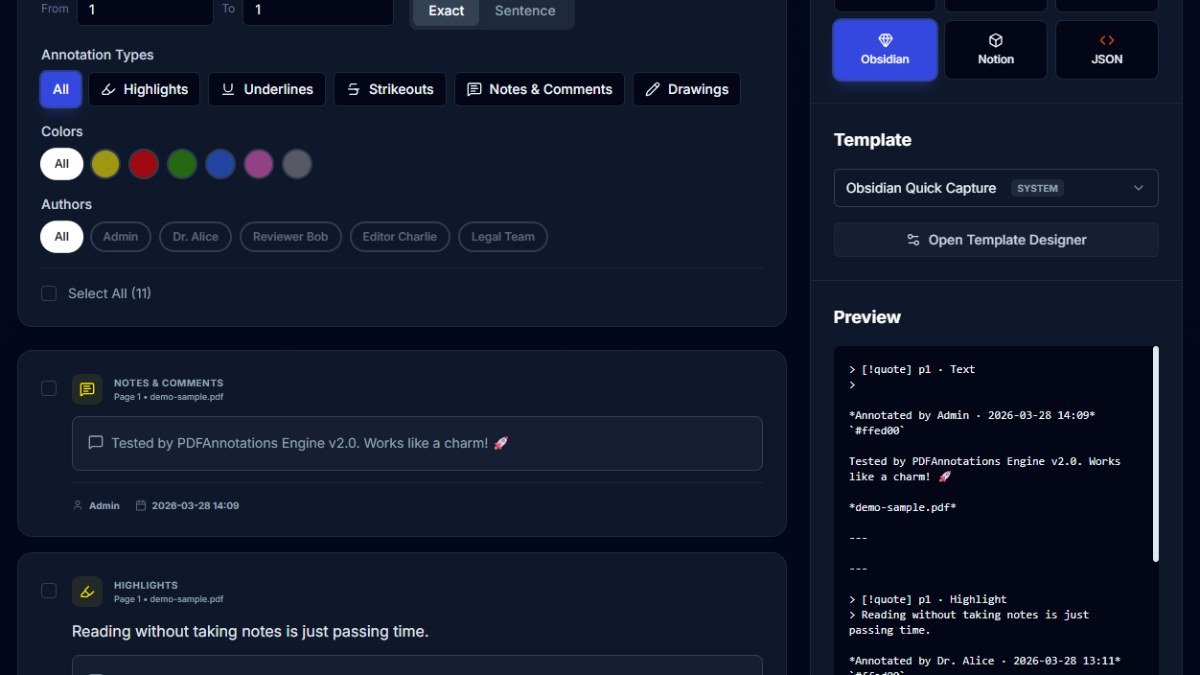
Export Word Comments is a free web application designed to extract review comments from Microsoft Word DOCX files. It allows users to easily pull out valuable feedback, including the comment ID, author, date, reliable status, comment text, and anchor text, directly from their documents.
This tool is ideal for anyone who collaborates on Word documents and needs to manage or repurpose the feedback received. This includes editors, reviewers, students, and professionals who want to organize, analyze, or share comments outside of the Word environment. The application is particularly useful for maintaining a clear record of revisions and discussions within a document.
Key features include local processing of DOCX files, meaning your documents are never uploaded to a server, ensuring privacy and security. Users can filter comments by author and resolved status. The extracted comments can be exported into various reusable formats such as Excel, CSV, Markdown, TXT, and JSON. The current version supports DOCX files only and does not estimate page numbers.
Getting started is straightforward. Simply drag and drop your DOCX file into the web application. You can also use the provided demo DOCX to see how the export works. Once processed, you can search and filter the comments within the tool before downloading them in your preferred format.
Key features
- Export Word commentsPull every comment from a DOCX file into one clean, organized list.
- Multiple export formatsDownload comments as CSV, Markdown or TXT for free, or Excel and JSON with Pro.
- Custom templatesPro users can design reusable export templates with their own fields and order.
- Filter by authorShow only the comments left by a specific reviewer.
- Resolved status filterSeparate open and resolved comments when the document stores that data.
- Search commentsQuickly find any comment inside the Workspace.
- Rich export fieldsEach export includes comment ID, author, date, status, comment text and anchor text.
- Local processingFiles are processed in your browser and never uploaded to a server.
- No signup neededStart exporting instantly without creating an account.
- Demo DOCXTry a sample document to see the output before using your own file.
Who should use PDFAnnotations Export Word Comments?
- Editors collecting reviewer feedback on drafts
- Lawyers reviewing comments on contracts
- Writers and authors working with editors
- Students tracking feedback from teachers
- Teams running document reviews and approvals
- Project managers turning comments into task lists
How to use PDFAnnotations Export Word Comments
- Go to the Export Word Comments page on PDFAnnotations
- Drag and drop your DOCX file or click Select DOCX
- Open the document in the Workspace
- Search comments or filter by author and resolved status
- Choose an export format like CSV, Markdown, TXT, Excel or JSON
- Download your exported comments
PDFAnnotations Export Word Comments FAQ
Can I export Word comments to Excel?
Yes, Excel export is available with the Pro plan. CSV, Markdown and TXT exports are free.
Is my Word document uploaded to a server?
No. The DOCX file is processed in your browser and stays on your device.
Can I filter Word comments by author?
Yes, you can filter by author and by resolved status inside the Workspace.
Does it include page numbers or Track Changes?
No. The current version doesn’t add page numbers or extract Track Changes and version history.
Free alternatives to PDFAnnotations Export Word Comments
See all Productivity toolsPDFAnnotations Export Word Comments is listed as a free alternative to Manually copying Word comments, Word VBA macros, DocTools ExtractWord. Here are more free tools from the PeplioHUB community.
 A ApexPDF Review: 100+ Free Private PDF Tools, No UploadsPrivacy-first PDF tools that run in your browserProductivity
 Y yourhack.ai1,068 free browser tools plus a launch platform for makers and side projectsProductivity
 C Companies Builder : Free AI SEO & Performance AuditorCompanies Builder offers a free AI-powered SEO and performance auditor. Paste your website URL and it instantly analyses your Core Web Vitals,...Other
A AI Visibility TrackerAI Visibility Tracker helps you check if your website or content is being cited by AI tools like ChatGPT, Perplexity, and Google...SEO
C Companies Builder : Free AI SEO & Performance AuditorCompanies Builder offers a free AI-powered SEO and performance auditor. Paste your website URL and it instantly analyses your Core Web Vitals,...Other
A AI Visibility TrackerAI Visibility Tracker helps you check if your website or content is being cited by AI tools like ChatGPT, Perplexity, and Google...SEO
 M MangaTranslate Review: AI Comic and Manga TranslatorAI comic translator that reads, translates and re-letters manga dialogue in imagesAI tools
 Z ZOQENA Coverage Gap CalculatorFree calculators to see how much revenue missed calls and failed payments cost youMarketing
Reviews from makers
Makers who list on PeplioHUB test each other's tools. Be the first to review PDFAnnotations Export Word Comments.
Have you tried PDFAnnotations Export Word Comments?
Share what worked, what did not, or ask the maker a question.