
 W
WorkinVirtual
Track remote job applications, interviews, offers and follow-ups.
About this tool
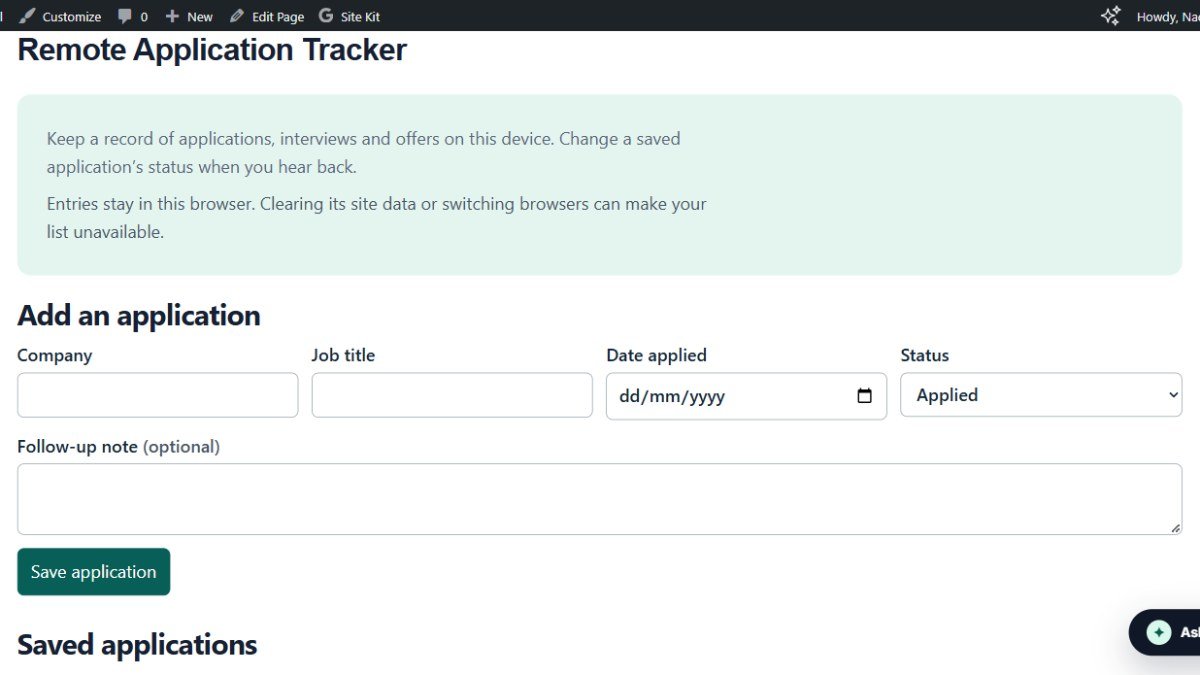
WorkinVirtual is a free, browser-based tool designed to help job seekers manage their remote job applications. It provides a simple way to keep track of every step in the job application process, from initial submission to potential offers.
The tool solves the common problem of losing track of multiple applications, interviews, and follow-up actions. By offering a centralized place to record details about employers, job titles, application dates, and statuses, WorkinVirtual helps users stay organized and ensures no opportunity is missed. It's particularly useful for those applying to many positions simultaneously.
Best for: Remote job seekers who need a simple way to track their applications, interviews, and follow-ups.
Peplio's take
WorkinVirtual is a straightforward tool for anyone managing a job search. Its main strength is its simplicity and the fact that it requires no signup, allowing immediate use. However, users should be mindful that data is stored locally in the browser and can be lost if site data is cleared.
Peplio summary based on the maker's details and the tool's website, November 2026
Key features
Application trackingRecord employers, job titles, and application dates.
Status updatesLog the current status of each job application.
Interview loggingKeep notes on interview dates and details.
Follow-up remindersAdd optional notes for timely follow-ups.
Browser-basedAccess and manage your applications directly in your web browser.
No account requiredStart tracking applications immediately without signing up.
Perfect for
Tracking applications for multiple remote jobs.
Remembering interview details and follow-up actions.
Organizing job search progress in one place.
Managing applications across different companies and roles.
How to use WorkinVirtual
- Open WorkinVirtual in your web browser.
- Enter details for a new job application, including company, role, and date applied.
- Update the status as you progress through the hiring process.
- Add optional follow-up notes to stay on track.
Pricing
WorkinVirtual FAQ
Is WorkinVirtual free to use?
Yes, WorkinVirtual is a free tool. It offers a freemium model, but the core application tracking features are available at no cost.
Who is WorkinVirtual for?
It is designed for job seekers, especially those looking for remote positions, who need to manage multiple applications and stay organized.
How does WorkinVirtual store my data?
The tool saves your entries directly in your current browser. It does not require an account. Be aware that clearing your browser's site data may remove your saved list.
Can I access my applications from any device?
WorkinVirtual is a web app, but it stores data locally in your browser. This means your saved applications are tied to the specific browser and device you used to enter them.
Reviews from makers
Makers who list on PeplioHUB test each other's tools. Be the first to review WorkinVirtual.
Have you tried WorkinVirtual?
Share what worked, what did not, or ask the maker a question.