
 G
GGoogle Business Profile Category Finder
Pick the right Google Business Profile categories, free
About this tool
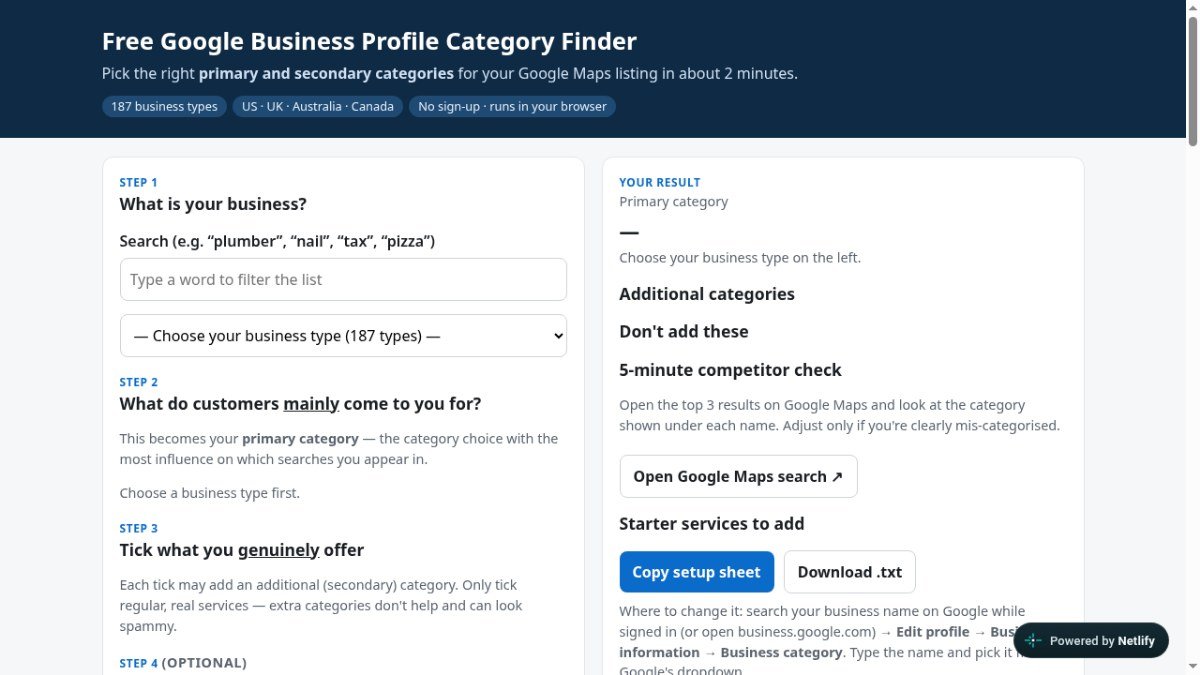
Choosing the right categories for your Google Business Profile is crucial for local SEO, but it can be tricky to know which ones best represent your business and will attract the right customers. The Google Business Profile Category Finder helps you navigate this complexity by suggesting the most effective primary and secondary categories for a wide range of local business types.
This free, no-signup tool simplifies the process by guiding you through identifying what your business is and what customers primarily seek from you. It provides insights into categories to avoid and offers advice on address settings, drawing from over 350 category guides. By helping you select precise and relevant categories, it aims to improve your visibility in local search results on Google Maps and Search.
Best for: Local businesses wanting to improve their Google Business Profile visibility and attract more customers through accurate category selection.
Peplio's take
This tool is highly recommended for any business managing a Google Business Profile. Its clearest strength is simplifying the often confusing process of category selection to boost local search visibility. Before relying solely on its suggestions, consider cross-referencing with Google's official guidelines and observing top-performing competitors in your specific niche.
Peplio summary based on the maker's details and the tool's website, October 2026
Key features
Category suggestionsProvides primary and secondary category recommendations for 187 local business types.
Categories to avoidAdvises on categories that might negatively impact your profile's performance.
Address settings guidanceOffers advice on how to configure your business address settings.
Category guidesIncludes over 350 guides to help understand category choices.
Competitor analysisSuggests a quick check of competitor categories on Google Maps.
Description checkerA bonus tool to check your Google Business Profile description for common issues.
Perfect for
Finding the best primary category for a new local business listing.
Identifying relevant secondary categories to broaden search visibility.
Reviewing and optimizing existing Google Business Profile categories.
Understanding which categories might be misleading or unhelpful.
Ensuring category choices align with the core services offered.
How to use Google Business Profile Category Finder
- Enter your business type (e.g., 'plumber', 'restaurant').
- Identify what customers mainly come to you for to select your primary category.
- Tick the services you genuinely offer to add secondary categories.
- Optionally, check competitor categories on Google Maps for comparison.
- Use the provided guidance to update your categories on Google Business Profile.
Pricing
Google Business Profile Category Finder FAQ
Is the Google Business Profile Category Finder free to use?
Yes, the tool is completely free. It also does not require any signup to use its features.
Who benefits most from this tool?
Local business owners, marketers, and SEO professionals who manage Google Business Profiles will find this tool most valuable for optimizing their local search presence.
How does this tool help with Google Business Profile categories?
It suggests the most effective primary and secondary categories for your business type, helps identify categories to avoid, and provides guidance based on over 350 category examples.
Do I need to sign up to use this tool?
No, there is no signup required. You can use the tool directly through your web browser without creating an account.
Reviews from makers
Makers who list on PeplioHUB test each other's tools. Be the first to review Google Business Profile Category Finder.
Related tools
View all M
M R
R A
A E
E P
P P
PHave you tried Google Business Profile Category Finder?
Share what worked, what did not, or ask the maker a question.