
 A
AAppScreen
Lay out App Store screenshot sets on one wide canvas in your browser
About this tool
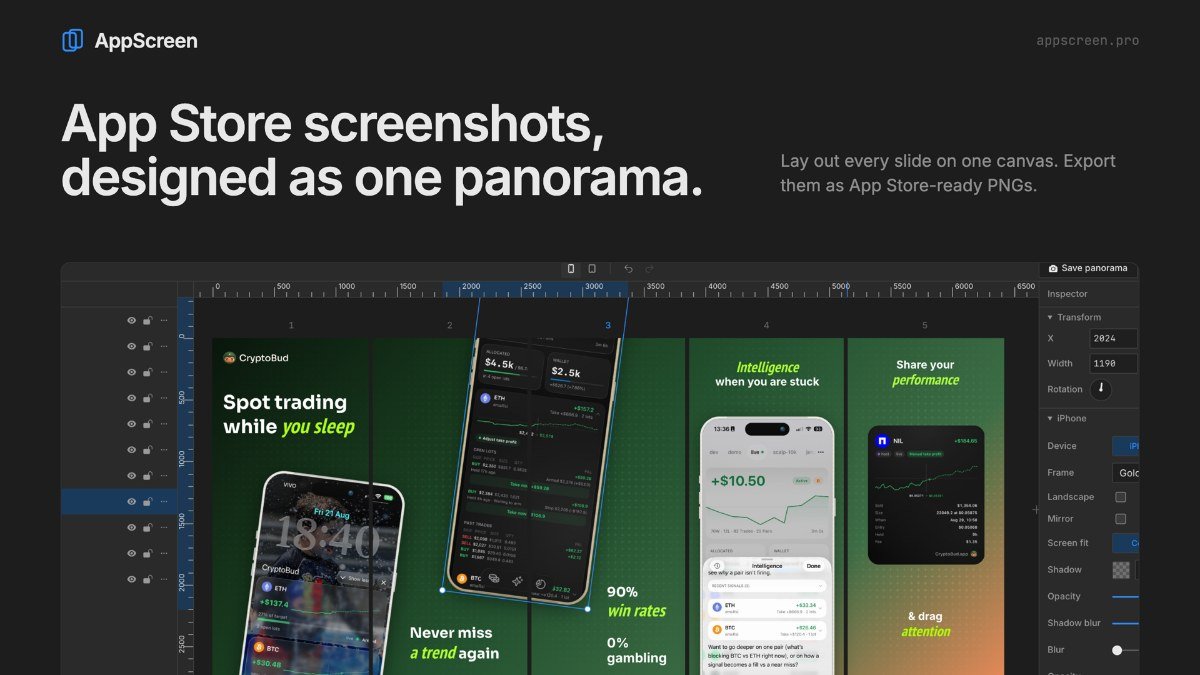
AppScreen is a web-based tool designed to simplify the process of creating App Store screenshot sets. It addresses the common challenge of designing multiple, consistent screenshots for app store listings by offering a unique wide canvas approach. Instead of working on individual slides, you can lay out your entire screenshot set on one long canvas, allowing elements like device frames or text to span across multiple images.
This method streamlines the workflow for developers and indie makers who manage their own app store pages. You import your app's raw captures, place them within iPhone or iPad device frames, add headlines, and can even use presets to speed up the layout process. AppScreen then automatically cuts the wide canvas into the individual images required by the App Store, ensuring consistency and saving you time with each app update.
Best for: iOS developers and indie makers who need to create consistent App Store screenshot sets efficiently.
Peplio's take
App Store screenshots are one of the biggest drivers of app downloads, yet most indie developers either hire a designer or wrestle with Figma templates. AppScreen gives you a focused editor that only does this one job, which makes it much faster to get professional-looking store panels.
The panorama approach is the standout. Many top apps use screenshots where a phone or background stretches across two panels, which looks great when users swipe. AppScreen builds that by default and slices the panels for you at export. The one-time $9 price is also refreshing compared to monthly subscriptions in this space.
The trade-off is that some presets and background patterns are locked behind the paid upgrade, and you still need good app screenshots and headline copy for the result to shine. Best for indie app developers, startups, mobile app marketers and agencies preparing App Store listings.
Written by Sougan Kumar Mandi, October 2026
Key features
Wide canvas editorDesign your entire screenshot set on a single, long canvas.
Device framingPlace your app captures inside realistic iPhone and iPad frames.
Headline creationAdd clear and concise headlines to your screenshots.
Preset layoutsStart with pre-designed templates for faster creation.
Automatic slicingThe tool automatically cuts the wide canvas into individual images for the App Store.
Perfect for
Designing a new set of App Store screenshots for an app launch.
Updating existing screenshots with new app features.
Ensuring visual consistency across all app store images.
Quickly generating screenshot sets using pre-defined layouts.
How to use AppScreen
- Import your raw app screen captures.
- Place captures into iPhone or iPad device frames on the wide canvas.
- Add headlines and adjust layouts using presets if desired.
- AppScreen automatically slices the canvas into individual images.
Pricing
AppScreen FAQ
Is AppScreen free to use?
Yes, AppScreen offers a freemium model. The free version includes the core editor for creating App Store screenshots. A one-time Pro purchase unlocks additional features.
Who is AppScreen designed for?
AppScreen is intended for iOS developers and indie makers who are responsible for creating and managing their own app store listings.
What makes AppScreen different from other tools?
AppScreen uses a unique wide canvas approach, allowing you to design your entire screenshot set on one long canvas that is later automatically sliced into individual images.
Do I need to sign up to use AppScreen?
Based on the information provided, there is no mention of a required signup for the core editor. Saved work stays on the device.
Reviews from makers
Makers who list on PeplioHUB test each other's tools. Be the first to review AppScreen.
Related tools
View allAppScreen is listed as an alternative to Figma screenshot templates. More tools from the PeplioHUB community:
 S
S W
W M
M A
A D
D T
THave you tried AppScreen?
Share what worked, what did not, or ask the maker a question.