
 P
PPretty QR
Create branded QR codes free
What is Pretty QR?
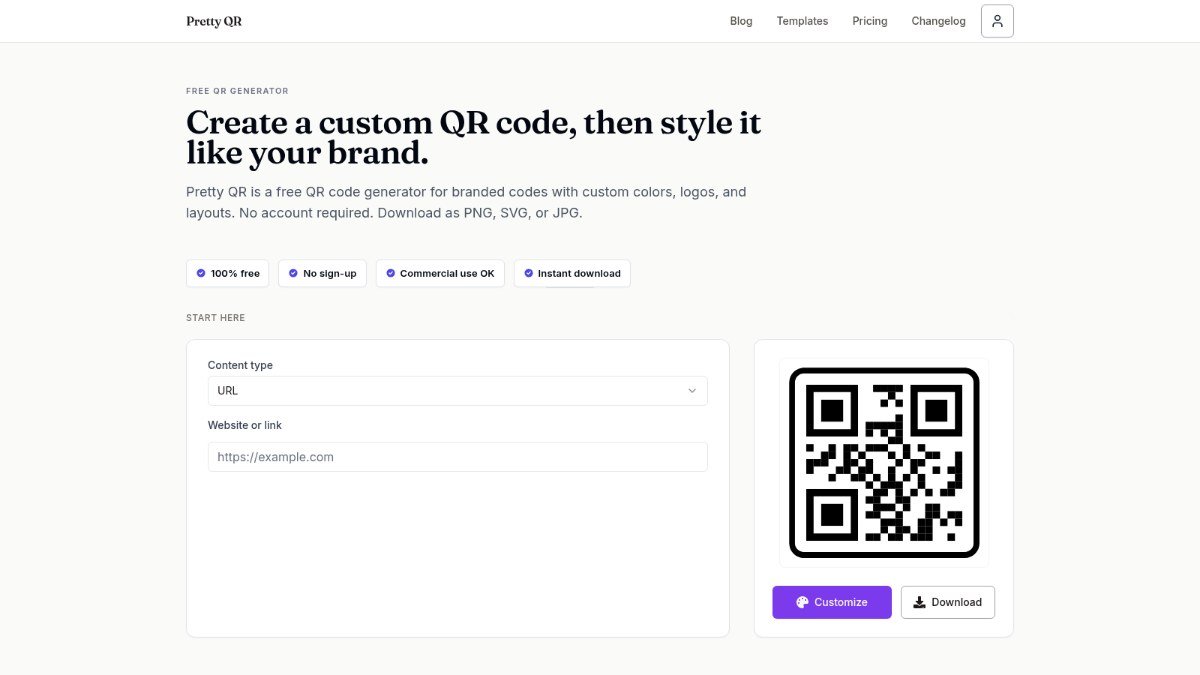
Pretty QR is a free online tool that helps you create custom QR codes that reflect your brand. Instead of generic black and white squares, you can design QR codes with your brand colors, add your logo in the center, and even choose unique shapes for the code's frame and modules.
This tool solves the problem of boring, unbranded QR codes that don't fit your marketing materials. By allowing extensive customization, Pretty QR ensures your QR codes look professional and align with your visual identity, making them more engaging for your audience. All generated codes are static, meaning they will continue to work indefinitely without requiring a subscription.
Best forMarketers, bloggers, and creators who want to create visually appealing and branded QR codes for their campaigns.
Key features
- Customizable colorsAdjust the colors of your QR code modules and frames to match your brand.
- Logo uploadAdd your logo to the center of the QR code without affecting scannability.
- Shape optionsChoose from various frame shapes like hearts, circles, or speech bubbles.
- Multiple content typesGenerate QR codes for URLs, text, Wi-Fi credentials, vCards, emails, and phone numbers.
- Instant downloadDownload your created QR codes immediately in PNG, JPG, or SVG formats.
- No account requiredStart creating branded QR codes instantly without needing to sign up.
Who should use Pretty QR?
- Adding a QR code with your logo to business cards.
- Creating a custom QR code for a promotional flyer.
- Designing a branded QR code for social media links.
- Generating a QR code for Wi-Fi access at an event.
How to use Pretty QR
- Go to the Pretty QR website.
- Choose a template or start from scratch.
- Customize colors, add your logo, and select a frame shape.
- Download your branded QR code in your desired format.
Pretty QR FAQ
Is Pretty QR free to use?
Yes, Pretty QR is a completely free tool. You can create and download branded QR codes without any cost or subscription.
Do I need to create an account to use Pretty QR?
No, you do not need to sign up or create an account to use Pretty QR. You can start designing and downloading your QR codes immediately.
What types of content can I put in a QR code?
Pretty QR supports various content types, including website links, plain text, Wi-Fi network details, vCard contact information, email addresses, and phone numbers.
Can I use the QR codes for commercial purposes?
Yes, the QR codes generated with Pretty QR can be used for both personal and commercial purposes.
Free alternatives to Pretty QR
See all Design and image tools A AppScreenLay out App Store screenshot sets on one wide canvas in your browserDesign and images
 T TeslaWrapsFree browser editor for Tesla Paint Shop wraps with 3D preview and PNG exportDesign and images
 P PromptImageFree AI image & video generator with a prompt libraryDesign and images
 S SerpaioRank on Google. Get cited by AI.SEO
 M MangaTranslate Review: AI Comic and Manga TranslatorAI comic translator that reads, translates and re-letters manga dialogue in imagesAI tools
 Z ZOQENA Coverage Gap CalculatorFree calculators to see how much revenue missed calls and failed payments cost youMarketing
Reviews from makers
Makers who list on PeplioHUB test each other's tools. Be the first to review Pretty QR.
Have you tried Pretty QR?
Share what worked, what did not, or ask the maker a question.