AI Background Remover free No Login — 5 Best Tools Tested (2026)
Sources: Digital Marketing Institute (2026), Upsampler AI Research (2026)
If you are looking for an ai background remover free no login that actually delivers a clean transparent PNG — without making you create an account, sit through a watermark preview, or pay for a subscription — this guide gives you exactly that. Background removal used to require Photoshop, masking skills, and 20 minutes of careful editing. In 2026, AI does the same job in under 5 seconds. The real problem is not finding a background remover — it is finding one that is genuinely free, genuinely no-login, and genuinely good.
Most “free” tools are free in name only: they blur the output, stamp a watermark, or demand your email before you can download anything. I have tested 5 of the best free ai background remover no login tools available right now — including the background remover tool I built directly on Peplio.
Here is an honest comparison of what each one actually delivers. Looking for more free AI image tools beyond background removal? See the full list: Free AI Image Generator Without Login — Every Tool Worth Using.
What Is AI Background Removal and How Does It Work?
An ai background remover free no login tool uses computer vision and deep learning to automatically separate the foreground subject from the background in an image — without any manual selection or masking. Traditional background removal required manually drawing around your subject in Photoshop, using the magic wand tool, and then cleaning up the edges by hand.
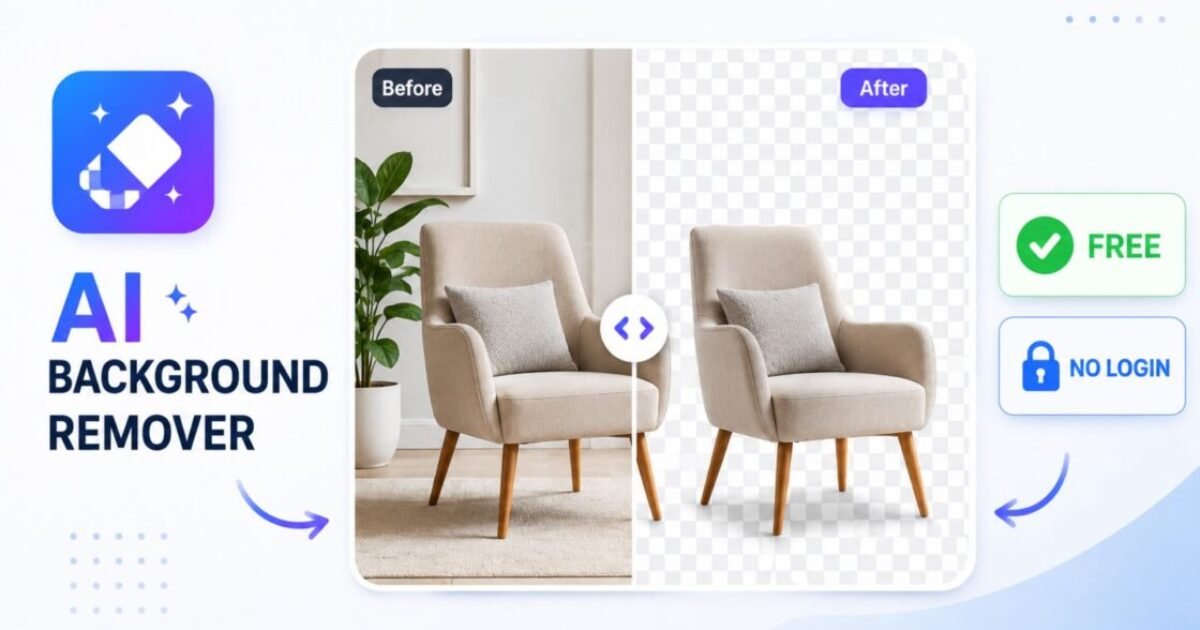
For complex subjects like hair, fur, or transparent objects, this could take 20–30 minutes per image even for a skilled editor. Modern AI background removers use neural networks trained on millions of images to recognize subjects — people, products, animals, objects — and separate them from their backgrounds in seconds. The output is a transparent PNG where the background has been cleanly removed, ready to drop onto any new background or use on its own.
What makes a good AI background remover:
- Clean edge detection — especially around hair, fur, and fine details
- No colour bleeding from the background onto subject edges
- Full-resolution output — not a downscaled preview
- Fast processing — under 10 seconds for most images
- Transparent PNG download — not a JPEG with a white background
5 Best Free AI Background Remover No Login Tools (2026)
I tested all 5 tools with 3 source images: a product shot on a cluttered shelf, a portrait with wavy hair, and a pet photo with complex fur edges. Here is exactly what each ai background remover free no login tool delivered.
1. Peplio Background Remover Tool — Best Free No Login Tool Built for Simplicity
The Peplio Background Remover Tool is a free ai background remover no login tool I built specifically for people who want zero friction — no account, no watermark, no complicated steps. Open the tool, upload your image, click Remove Background, and download your transparent PNG in under 5 seconds. It supports JPG, PNG, and WEBP formats up to 5MB. The AI uses advanced image processing technology to detect your subject and remove the background with accurate edge detection. Your image is processed securely and not stored permanently — privacy is built in.
What makes it stand out: It is genuinely the simplest tool in this list. No decisions to make, no settings to configure, no upsell screens between you and your download. Upload → Remove → Download. That is the entire workflow. For anyone who just needs a clean background removal done quickly, this is the right starting point.
Best for: Quick one-off background removals, ecommerce product photos, social media content, YouTube thumbnails, anyone who wants zero friction and zero cost. 👉 Try the Peplio Background Remover Tool free — no login, no watermark
2. Remove.bg — Best for Edge Accuracy on Complex Subjects
Remove.bg pioneered one-click AI background removal back in 2018 and remains the edge accuracy benchmark in 2026. Their AI model handles hair strands, semi-transparent objects, and complex fur better than almost any other tool — which is why it is still the reference point every new tool compares itself against. The free tier delivers a low-resolution output without an account required. For many use cases — social media posts, website thumbnails, quick previews — the free resolution is sufficient. For full-resolution downloads, a paid plan starts at $9/month.
What makes it stand out: Edge quality on difficult subjects. If you have a product photo with reflective surfaces or a portrait with flyaway hair, Remove.bg consistently produces cleaner edges than any other free tool in this list.
Limitation: Full-resolution output requires payment. If you need high-res results for print or large-format use, the free tier falls short.
Best for: Complex subjects, hair and fur, when edge accuracy matters more than output resolution. 👉 Try Remove.bg free
3. Erase.bg — Best Free No-Login Alternative to Remove.bg
Erase.bg is one of the few competitors that offers free background removal without mandatory signup and delivers full-resolution output on the free tier. For users who need Remove.bg-level quality but cannot accept the resolution limitation on free downloads, Erase.bg is the natural alternative. Processing speed is good — most images complete in 5–8 seconds — and the edge quality is solid on standard subjects. Where it falls slightly behind Remove.bg is on very complex edges like fine hair or transparent materials, where the AI occasionally misses detail that Remove.bg catches.
What makes it stand out: Full-resolution free output with no login. This combination is rare — most tools that offer free use either limit resolution or require registration. Erase.bg gives you both without either condition.
Limitation: Quality can be inconsistent on complex edges, particularly fine hair and fur. Free users may also experience longer processing queues during peak hours.
Best for: Full-resolution transparent PNGs without a login, standard product photos and portraits. 👉 Try Erase.bg free — no login required
4. Canva Background Remover — Best for Users Already in a Design Workflow
Canva’s background remover is included in the free Canva plan with a free account. It is not a standalone tool — it works inside Canva’s design editor, which means background removal happens as part of a broader design workflow. If you are already using Canva to create social media posts, presentations, or marketing materials, this is the most convenient option. Quality is strong for standard portraits and product shots. The AI handles clean edges well and integrates seamlessly with Canva’s template library — remove the background, place the subject on a new background or design template, and export — all in one tool without switching between apps.
What makes it stand out: Workflow integration. If background removal is one step in a larger design process rather than a standalone task, Canva eliminates the need to switch between tools.
Limitation: Requires a free Canva account. Not suitable for quick standalone background removal without the design workflow context.
Best for: Social media creators, marketers, designers already using Canva for content creation. 👉 Try Canva Background Remover free
5. Clipdrop Remove Background — Best Quality from an Official AI Lab
Clipdrop is Stability AI’s consumer product — the same company behind Stable Diffusion. Their Remove Background tool uses official Stability AI models, which means output quality is consistently high and edge detection is among the best in the free no-login category.
No account is required for basic use, and the free tier gives you several uses per day with no watermark on the output. For users who occasionally need professional-quality background removal without paying, Clipdrop is the highest-quality free no-login option available from an official AI research lab.
What makes it stand out: Output quality. Because it runs official Stability AI models, Clipdrop produces more polished results than community-built alternatives on the same category of image. The edge detection is particularly strong on product photography.
Limitation: Free uses are capped per day without login. For heavy use you will hit the limit. Best used for final high-quality outputs rather than bulk processing.
Best for: Professional-quality output for ecommerce listings, client work, or any situation where edge quality is the priority and daily volume is low. 👉 Try Clipdrop Remove Background free
Quick Comparison — All 5 Free AI Background Remover No Login Tools
| Tool | Login? | Resolution | Watermark | Daily Limit | Best For |
|---|---|---|---|---|---|
| 🦸 Peplio Tool | ❌ No | Full | ❌ None | Free | Simplest workflow |
| Remove.bg | ❌ No | Low-res free | ❌ None | Limited | Best edge accuracy |
| Erase.bg | ❌ No | Full | ❌ None | Limited | Full-res free |
| Canva | ⚠️ Free account | Full | ❌ None | Limited | Design workflow |
| Clipdrop | ❌ No | Full | ❌ None | 3–5/day | Highest quality |
How to Remove a Background Free Without Login — Step by Step
Using any ai background remover free no login tool follows the same simple workflow. Here is the exact process using the Peplio Background Remover Tool:
Step 1 — Prepare and upload your image. Go to the Peplio Background Remover Tool. Drag and drop your image onto the upload area or click to browse. Supported formats are JPG, PNG, and WEBP up to 5MB. For best results, use the highest-quality version of your image — AI edge detection performs better with more pixel data to work from.
Step 2 — Click Remove Background. Click the “Remove Background AI” button. The AI processes your image automatically — no settings to configure, no selections to draw. The neural network identifies your subject and separates it from the background in under 5 seconds.
Step 3 — Preview the result. The processed image appears on screen with the background removed and replaced by a transparent checkerboard pattern — the standard visual indicator of a transparent background. Check the edges around your subject. For most standard subjects, the result is clean and ready to use immediately.
Step 4 — Download your transparent PNG. Click download to save your transparent PNG. The file is ready to use immediately — place it on any new background in Canva, PowerPoint, your website, or any image editor without any further editing needed.
Best Use Cases for Background-Removed Images
Once you have a clean transparent PNG from any ai background remover free no login tool, here is exactly where it adds value:
| Use Case | What You Do | Recommended Tool |
|---|---|---|
| Ecommerce product listings | White background product photos for Amazon, Flipkart, Meesho | Peplio Tool or Clipdrop |
| Social media posts | Place product or person on branded background | Peplio Tool or Canva |
| YouTube thumbnails | Cut out face/subject, place on custom thumbnail background | Peplio Tool or Erase.bg |
| Website banners | Product images on hero sections without background clash | Clipdrop or Remove.bg |
| Presentations and slides | Clean product or person images on any slide background | Peplio Tool or Canva |
| Logo and branding | Remove white background from logos for transparent use | Peplio Tool or Erase.bg |
Tips for Cleaner Background Removal Results
Use the highest resolution source image you have. AI background removal performs significantly better with more pixel data. A 1200px image produces cleaner edges than a 400px thumbnail of the same subject. Always use the original file, not a compressed download.
High contrast between subject and background helps. If your subject and background are similar in colour — a white product on a light beige background, for example — the AI has less to work with. Shooting products or portraits against a contrasting background before using any free ai background remover no login tool produces consistently better results.
For hair and fur, try multiple tools. Complex hair and fur edges are the hardest test for any AI background remover. If one tool produces rough edges around hair, try the same image in Remove.bg or Clipdrop — different models handle these cases differently and the result can vary significantly between tools on the same image.
PNG format preserves transparency — always download PNG. If a tool gives you a choice of download format, always choose PNG. JPG does not support transparency and will fill your transparent background with white. The transparent checkerboard you see in the preview only carries through to a PNG download.
Crop tightly before uploading. Remove unnecessary background area before uploading. A tightly cropped image with the subject filling most of the frame gives the AI a clearer task and reduces the chance of the model misidentifying background elements as part of the subject.
- Peplio Background Remover Tool — 100% free, no login, no watermark, transparent PNG in 5 seconds
- Remove.bg — best edge accuracy for hair and complex subjects, low-res free download
- Erase.bg — full-resolution free output, no login, consistent on standard subjects
- Canva — best for design workflows, requires free account, integrated with templates
- Clipdrop — highest output quality from official Stability AI models, 3–5 free uses/day
- Always download as PNG — JPG does not support transparency
- Use the highest-resolution source image you have — quality in = quality out
- For complex hair and fur, test multiple tools and compare results
Frequently Asked Questions
What is the best free AI background remover with no login in 2026?
Is the Peplio Background Remover Tool really free with no login?
What image formats does the Peplio Background Remover support?
Does AI background removal reduce image quality?
Are my images safe when using a free background remover?
Can I use background-removed images commercially?
Final Thoughts on Free AI Background Remover No Login Tools in 2026
Finding the right ai background remover free no login tool comes down to what you need from it — simplicity, edge quality, resolution, or workflow integration. For most people, the Peplio Background Remover Tool is the right starting point — completely free, no account, no watermark, clean transparent PNG in 5 seconds. If your subject has complex hair or fur and you need maximum edge accuracy, test the same image in Remove.bg or Clipdrop and compare.
If you need full-resolution output without any login, Erase.bg covers that gap. Background removal is just one part of the free AI image editing toolkit. For more free no-login AI tools including generators, upscalers, and image-to-image tools, see our complete guide: Free AI Image Generator Without Login — Every Tool Worth Using in 2026.
-
- Peplio Background Remover Tool — Free, No Login, No Watermark
- Free AI Image Generator Without Login — Every Tool Worth Using
- Image to Image AI Free No Login — 6 Best Tools Tested
- AI Image Upscaler Free Without Login — 6 Best Tools Tested
- How to Write Prompts for AI Image Generators — Full Guide
- Perchance AI Image Generator Review — Tested and Honest
Want to Use AI for Your Marketing?
Now that you know how to use AI image tools, here’s what to do next on Peplio:
-
- 🎨 Try the Best Free AI Image Generator Without Login — unlimited generations, no signup needed.
- 🛠️ Explore Free SEO & Marketing Tools — built for bloggers and small businesses.
- 📖 Read Digital Marketing Comics — learn SEO and marketing through fun stories.