Best Prompts to Generate Realistic AI Images (2026) – Powerful Secrets for Stunning Results
I still remember the first time I tried generating an AI image. I typed something simple like “a man working on a laptop”… and boom — what I got was a weird-looking human with six fingers and a face that didn’t feel real at all. At that moment, I realized something important: AI tools are powerful, but prompts decide everything. That’s where the real game begins. If you’re struggling with getting realistic results, you’re not alone. Most creators, small business owners, and marketers across the US face the same issue — AI-generated images often look fake unless you know exactly how to guide the tool. That’s why understanding the Best Prompts to Generate Realistic AI Images is not optional anymore — it’s a necessity, especially if you’re trying to attract customers online or build a brand that looks trustworthy. In this article, I’ll walk you through real-tested prompt strategies, mistakes I made, what actually works, and how US-based creators are using these prompts to create images that look almost indistinguishable from real photos. This isn’t theory — this is based on actual testing, failures, and improvements.
Peplio Reality Check
- Expected: AI will generate realistic images automatically
- Happened: Images looked fake, distorted, and unusable
- Surprised: Small prompt tweaks completely changed the output quality
What this article will NOT do
This article won’t promise that every AI image will be perfect instantly. It won’t give you copy-paste magic prompts without explaining why they work. And it definitely won’t push tools blindly. Instead, you’ll understand the logic behind prompts so you can create your own realistic images consistently.
Why Most AI Images Look Fake
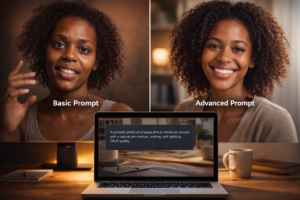 Before jumping into the Best Prompts to Generate Realistic AI Images, you need to understand why things go wrong. Most people type very basic prompts. Something like “woman smiling” or “office background.” That’s way too vague for AI. AI doesn’t think like humans. It doesn’t understand context unless you clearly describe it. That’s why results look artificial. I’ve already broken this down deeply in my previous guide on why AI images look fake, but in short — lack of detail equals fake output.
Core Formula Behind Realistic AI Prompts
After testing dozens of variations, I realized that the Best Prompts to Generate Realistic AI Images follow a simple but powerful structure. Think of it like building a sentence that AI can “see.” Here’s the core formula: Subject + Environment + Lighting + Camera + Details + Emotion + Quality Let me explain this in a real-world US example. Instead of writing: “A man working on a laptop” Write: “A 32-year-old American male entrepreneur working on a laptop in a modern home office in Texas, natural window lighting, DSLR camera shot, realistic skin texture, shallow depth of field, focused expression, ultra high resolution, 4K photography” Now see the difference? This is how the Best Prompts to Generate Realistic AI Images actually work.
🧪 Peplio Experiment #1
Goal: Create a realistic business image Action: Used basic vs detailed prompt Result: Detailed prompt looked 10x more realistic Next Change: Added camera and lighting details
Best Prompt Styles That Actually Work
1. Professional Photography Style Prompt
 This is one of the most effective approaches for the Best Prompts to Generate Realistic AI Images. If you’re targeting US customers, especially for marketing or branding, this style works insanely well. Example: “A professional headshot of a confident female business owner in New York, wearing formal attire, soft natural lighting, DSLR camera, 85mm lens, blurred office background, realistic skin tone, high detail, corporate photography” This type of prompt is perfect for LinkedIn, websites, and business branding.
2. Lifestyle Realism Prompt
If you’re trying to connect emotionally with customers — like showing daily life, home scenes, or relatable situations — this works best. Example: “A young couple in California enjoying breakfast in a cozy kitchen, morning sunlight through window, candid photography style, realistic shadows, natural expressions, 4K resolution” These kinds of prompts are widely used in content marketing across the US because they feel authentic.
3. Product + Human Combination Prompt
If you run a business or eCommerce store, this is gold. The Best Prompts to Generate Realistic AI Images often combine product with human interaction. Example: “A small bakery owner in Texas holding freshly baked bread, warm indoor lighting, rustic kitchen background, realistic textures, smiling naturally, professional food photography” This approach helps customers trust your brand more.
Internal Strategy (What I Did on Peplio)
Most blogs suggest just copying prompts. I didn’t follow that. Instead, I studied patterns and tested variations. I combined learnings from my previous articles like how to generate realistic AI images and refined them into a repeatable system. Then I tested tools mentioned in my guide on free AI image generator without login, and compared results across platforms. What I found? Prompt structure matters more than the tool itself.
External Industry Insight
According to AI research studies, detailed prompts significantly improve output accuracy because models rely heavily on contextual cues. Similarly, NVIDIA AI research highlights that lighting, texture, and camera instructions improve realism in generated visuals. Platforms like Adobe Firefly and Stability AI also recommend adding environmental and photographic details for better results.
Common Mistakes You Must Avoid
Even if you know the Best Prompts to Generate Realistic AI Images, these mistakes can ruin everything: Most people forget lighting. Lighting is everything in realism. Without it, images look flat. Another mistake is ignoring camera details. Adding “DSLR”, “cinematic lighting”, or “50mm lens” instantly improves quality. Also, avoid overloading prompts. Too many unrelated elements confuse AI.
🧪 Peplio Experiment #2
Goal: Improve realism for marketing images Action: Added camera + lighting keywords Result: Images looked more professional Next Change: Tested emotional expressions
Advanced Prompt Trick (Used by US Marketers)
Here’s something interesting — many US-based marketers don’t just write prompts… they write scenarios. Instead of describing objects, they describe moments. Example: “A small business owner reviewing monthly sales reports on a laptop in a modern office, late evening lighting, focused expression, realistic reflections on screen, high detail, corporate environment” This storytelling approach is one of the most powerful methods in the Best Prompts to Generate Realistic AI Images.
Use Case: How US Small Businesses Get Customers Online
Let’s say you own a bakery in Texas (LLC registered business). Instead of using stock photos, you generate custom AI images using realistic prompts. Now your website looks authentic, your ads feel personal, and customers trust you more. This directly impacts conversions. When visuals look real, customers feel confident.
Internal Linking Strategy Applied
If you’re serious about mastering this, don’t miss my detailed comparison in free AI image generator without login unlimited. It helps you pick the right tool before applying these prompts. Also, combining prompt strategies with insights from realistic image generation guide creates a complete system.
Best Prompt Templates You Can Use
Here are some ready-to-use templates for the Best Prompts to Generate Realistic AI Images: 1. “A [age] [profession] in [location], natural lighting, DSLR camera, realistic skin texture, 4K” 2. “A candid photo of [scenario], soft shadows, high detail, cinematic lighting, realistic environment” 3. “Professional portrait of [person], studio lighting, sharp focus, ultra realistic, high resolution”
Questions I struggled with while building Peplio
Why do my images still look fake even after adding details? Because realism also depends on balance — too many details can confuse AI. Which tool gives best results? Honestly, most tools perform similarly if your prompt is strong. Do I need paid tools? Not necessarily — even free tools can produce realistic images with the right prompts.
If you’re a solo blogger with no audience, no money, and only a laptop…
Focus on mastering prompts instead of chasing tools. That’s what changed everything for me. Once I understood the logic behind the Best Prompts to Generate Realistic AI Images, my content started looking professional without spending on expensive software. And that’s exactly what gives you an edge in today’s competitive digital space.
Final Thoughts + What I’m Testing Next
Right now, I’m testing something interesting — combining AI prompts with real brand storytelling to create hyper-realistic marketing visuals. Not just images, but images that actually sell. If you take one action today, do this: rewrite your last prompt using the formula I shared. Add lighting, camera, and emotion. You’ll immediately see the difference. That’s the real shortcut.
Want to Use AI for Your Marketing?
Now that you know how to use AI image tools, here’s what to do next on Peplio:
- 🎨 Try the Best Free AI Image Generator Without Login — unlimited generations, no signup needed.
- 🛠️ Explore Free SEO & Marketing Tools — built for bloggers and small businesses.
- 📖 Read Digital Marketing Comics — learn SEO and marketing through fun stories.