AI Inpainting Free: 7 Best Tools + Free Object Remover
Every tool re-checked: November 27, 2026 · Last updated: November 27, 2026
For AI inpainting free with no signup, start with Pixnova (its FAQ says no login and no watermark) or Kontext AI (no signup, 10 starter credits). For editing with a prompt on your phone, CapCut is free with an account. To remove a small object from a simple background without uploading your photo anywhere, use Peplio’s free object remover below: it runs in your browser, has no limits and adds no watermark. Every tool here was re-checked on its own page on November 27, 2026.
I first tested AI inpainting tools for this page in June 2026. Kontext AI removed a large bin from a street photo cleanly, and OpenArt needed two attempts to swap a background for a sunset. Five months later, I checked Peplio’s Google Search Console and saw something uncomfortable: people reaching this page through Google’s AI Mode were typing follow-ups like “none of them work” and “where can I do this for free”. Free AI tools change fast. So I re-checked every tool on its own page, removed claims I could no longer confirm, and built a free object remover that works right here, with no signup and no upload.
Free Object Remover: No Signup, No Upload
Choose a photo, paint over the object you want to remove, and press Remove object. The tool fills the area with texture copied from the rest of your photo. Everything happens in your browser: your photo is never uploaded, there is no daily limit and no watermark.
Honest note: this is classic inpainting (patch matching), not generative AI. It works best on small objects over simple backgrounds such as sky, walls, sand, grass or water. For faces, crowds or replacing something with a prompt, use one of the AI tools below. Photos larger than 1,000 px are scaled down to 1,000 px on the long side.
What Is AI Inpainting?
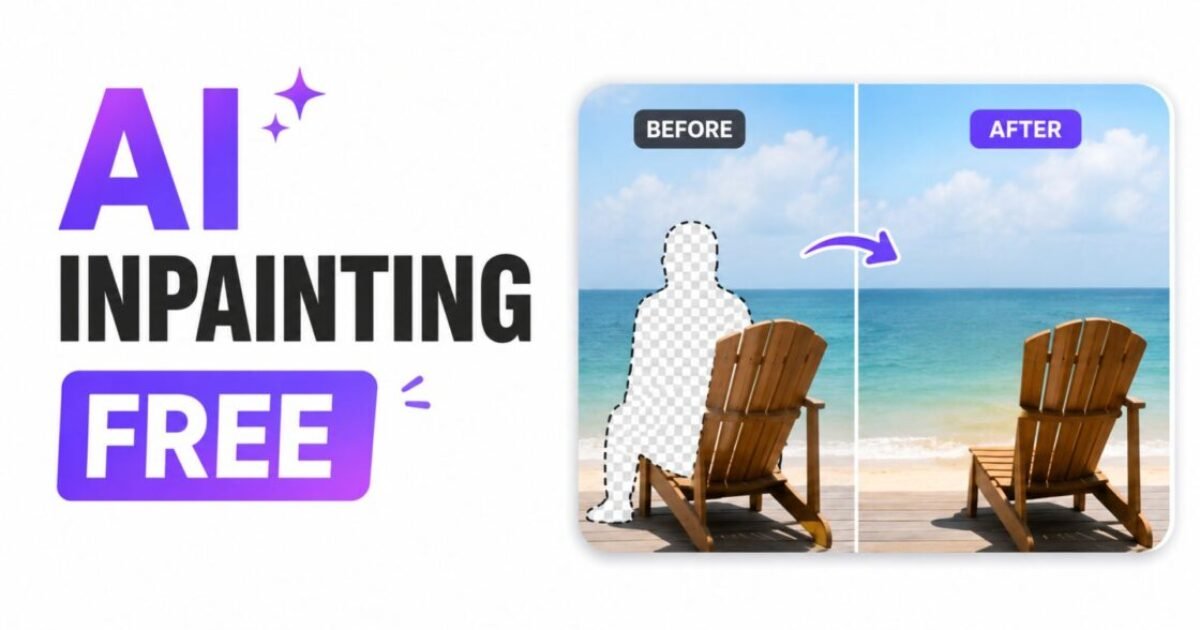
Inpainting means filling a selected part of an image so it blends with the rest. You paint a mask over the area, and the tool rebuilds it. AI inpainting uses a generative model, usually a diffusion model, to create new pixels for the masked area and can follow a text prompt, so you can replace a car with a tree, not only remove it (Hugging Face diffusers documentation). Classic inpainting, like Peplio’s tool above, copies texture from elsewhere in the same photo. It cannot invent new objects, but it is fast, private and free.
AI Inpainting Free Tools Compared (November 2026)
Each row comes from the tool’s own page or pricing page on November 27, 2026. “Not stated” means the page did not say. Free plans change often, so check before you edit important photos.
| Tool | Signup to get a result | Free limit (as stated) | Watermark | Best for |
|---|---|---|---|---|
| Peplio Object Remover | No | Unlimited, runs in your browser | None | Small objects on simple backgrounds, privacy |
| Pixnova | No (per its FAQ) | Not clearly stated | None (per its FAQ) | Quick AI edits without an account |
| Kontext AI | No | 10 starter credits (free plan) | Not stated | Prompt-based replacement with Flux |
| Template.net | After a few guest edits | A few guest edits, then credits | Not stated | Trying a few edits fast |
| CapCut | Yes (account) | Free, no number stated | Not stated | Beginners and phone editing |
| OpenArt | Login likely | One-time 100 trial credits (pricing page) | Not stated | Creative replacements, model choice |
| Flat AI | Not stated | “Free usage limits apply”, no number | Not stated | Light daily use; Unlimited is $20/month |
| Upsampler | Yes (credits) | No free credits stated; pay as you go at 4 cents per credit | Not stated | Advanced users who want many models |
Source: each tool’s own page and pricing page, read on November 27, 2026. The full list is in the free CSV below.
AI Inpainting Free Tools: What Is Free and What Is Not
1. Pixnova: best AI inpainting free with no signup
Pixnova’s page has an upload box (JPG, PNG or WebP up to 30MB), a prompt box and two model versions. Its FAQ says there is no need to sign up and that generated photos have no watermark. The page shows a usage counter but does not explain the free limit, so expect a cap on heavy use.
2. Kontext AI: best for prompt-based replacement
Kontext AI says “No sign up needed”, is powered by Flux, and supports JPG, PNG and WebP up to 4K. Its pricing page lists a free plan with 10 starter credits. In my June 2026 test it removed a large bin from a street photo cleanly. Note: on November 27, 2026 its pricing page said purchases are paused, so you cannot buy more credits there right now.
3. Template.net AI Inpaint: good for a few quick tries
Guests get a few free edits, then need to sign up and use credits. It has a brush from 1% to 100% size, undo and redo, and works with or without a prompt.
4. CapCut: best for beginners and phones
CapCut says its AI image inpainting is free and names the Seedream 5.0 and Nano Banana Pro models. The “Try” button leads to a signup page, so plan on a free account. It exports PNG, JPEG or PDF. Its pricing page did not load when I checked.
5. OpenArt: best for creative replacements
Select an area, describe the change, and pick from several image models. OpenArt’s pricing page lists one-time 100 trial credits and inpainting as a feature. In June it took me two attempts to replace a background with a sunset, which is normal for AI inpainting.
6. Flat AI: light daily use
Paint a mask and describe the change. Flat AI says free usage limits apply but gives no number; the Unlimited plan is $20 a month. Earlier this year it allowed 2 free uses a day, but the page no longer states a number.
7. Upsampler: for advanced users
Upsampler’s Image Edit lets you mask an area and redo only that part, with models such as Flux Fill Pro, Seedream 5 Pro and Nano Banana 2.1. It is pay as you go at 4 cents per credit, with edits costing 1 to 15 credits; Pro is $15 a month for 1,000 credits. No free credits were stated.
Removed from this list: Inpaint Online’s web tool could not be checked on November 27, 2026. Its desktop sibling, Inpaint by Teorex, rebuilds areas “from surrounding pixels” and is a paid download, not a free web tool.
Need the whole background gone, not one object? Remove it free, no login.
Which AI Inpainting Free Tool Should You Use?
| You want to… | Use |
|---|---|
| Remove a small object from sky, wall, sand or grass, privately | Peplio Object Remover (above) |
| Remove or replace something with AI, no account | Pixnova, then Kontext AI |
| Replace an object using a text prompt | Kontext AI or OpenArt |
| Edit on your phone | CapCut |
| Edit many images every day | Flat AI Unlimited or Upsampler credits |
| Fix a face or a person | An AI tool with a face model (OpenArt); classic removers are not for faces |
Tips for Cleaner AI Inpainting Free Results
- Paint 5 to 10 px beyond the object, including its shadow and reflection. Leftover edges cause ghost outlines.
- Use smaller masks. Remove a big object in two or three passes.
- Start from the largest photo you have. More pixels around the object means a better fill.
- Write a short prompt for AI tools: what should be there, its texture, and “same lighting as the photo”.
- Run it two or three times. AI results change every run; keep the best one.
Inpainting vs Background Remover vs Generative Fill
| Feature | What it does | Example |
|---|---|---|
| Object remover (classic inpainting) | Fills a painted area with texture from the same photo | Remove a bin from a pavement |
| AI inpainting | Creates new pixels in the painted area, can follow a prompt | Replace a car with a tree |
| Background remover | Cuts out the main subject and removes everything else | Product photo on a transparent background |
| Generative fill / outpainting | AI inpainting inside or beyond the image edges | Extend a photo to a wider banner |
Free Downloads: AI Inpainting Cheat Sheet and Tool List
Masking rules, a prompt formula, 10 ready prompts and fixes for blurry patches, ghost outlines and colour mismatches.
Download PDFAll 8 options with signup, free limit, watermark, paid option and check date.
Download CSV“Free” AI tools are a moving target. The only truly free option is one that runs on your own device.
Between June and November, free limits on these tools changed or disappeared, one tool paused purchases, and one web tool could not be checked at all. That is why I built a simple remover into this page. It will never beat a good AI model on faces or complex scenes, but for a sign, a bin or a stranger on a beach it does the job without an account. For everything else, try Pixnova first and keep Kontext AI as a backup.
Peplio’s comic stories teach SEO and marketing through a bakery that learns everything the hard way. Start reading the digital marketing comic stories.
- Peplio’s free object remover works in your browser: no signup, no upload, no watermark, best on simple backgrounds.
- For AI inpainting free with no signup, Pixnova and Kontext AI clearly say no account is needed.
- CapCut and OpenArt are strong but need an account; Template.net allows a few guest edits.
- Flat AI and Upsampler suit heavier use: $20/month unlimited, or 4 cents per credit.
- Paint beyond the edges, use small masks and retry two or three times for cleaner results.
Which AI inpainting tool is free with no signup?
Pixnova and Kontext AI both say no signup is needed, and Peplio’s object remover above needs no account at all.
Can I remove the whole background instead?
Yes, use a background remover instead of inpainting. Try Peplio’s free AI background remover with no login.
Can I generate a new image instead of editing one?
Yes. See our tested free AI image generators without login.
FAQ About AI Inpainting Free Tools
What is AI inpainting?
AI inpainting fills a painted area of an image with new pixels from a generative model, so you can remove or replace objects. You paint a mask, add an optional prompt and the AI rebuilds that area.
Is there a free AI inpainting tool without signup?
Yes. Pixnova and Kontext AI say no signup is needed (checked November 27, 2026). Peplio’s object remover on this page also needs no account and runs in your browser.
Do free inpainting tools add a watermark?
It depends on the tool. Pixnova’s FAQ says no watermark and Peplio’s remover adds none. Most other tools do not state it, so check the free plan before editing important photos.
Is Peplio’s object remover AI?
No. It uses classic inpainting that copies texture from your own photo, entirely in your browser. It is best for small objects on simple backgrounds; use an AI tool for faces or prompt-based replacement.
What is the difference between inpainting and a background remover?
Inpainting fills or replaces a selected area inside the photo. A background remover keeps the main subject and deletes everything around it.
Can I use this AI inpainting free tool list in my article?
Yes. The comparison table, cheat sheet and CSV are free to use. Please credit Peplio and link to peplio.com/ai-inpainting-free/.
Fact check: every free limit, signup rule, model name and price comes from each tool’s own page or pricing page as read on November 27, 2026. “Not stated” means the tool’s page did not say. My hands-on notes on Kontext AI and OpenArt come from my June 2026 tests. Peplio’s object remover timing comes from a real run on a 900 x 600 px test image. The AI Mode follow-up queries come from Peplio’s Google Search Console (October 30 to November 24, 2026).
Peplio is not affiliated with any tool on this list and receives no commission.
Sources for this AI inpainting free guide: Hugging Face: inpainting with diffusers, Pixnova AI inpainting, Kontext AI pricing, Template.net AI Inpaint, CapCut image inpainting, OpenArt pricing, Flat AI pricing, Upsampler pricing, Inpaint by Teorex.
Looking for AI inpainting free tools? This page compares 8 free options re-checked in November 2026 and includes a free object remover that runs in your browser with no signup or watermark. Use the AI inpainting free cheat sheet for cleaner results and bookmark this page, because we re-check every tool regularly.